Magento2 moduleの作成†
Magento2はModules, Themes, Language Packagesの3つから成り立っています。たぶん。
app/code 以下に作成することでモジュールを作成できるようです。
設定ファイルの作成†
app/code/VendorName/ModuleName/ の構成になります。
VendorName = Yassujp
ModuleName = HelloWorld とします。
app/code/Yassujp/HelloWorld/etc/module.xml
<?xml version="1.0"?>
<config xmlns:xsi="http://www.w3.org/2001/XMLSchema-instance" xsi:noNamespaceSchemaLocation="../../../../../lib/internal/Magento/Framework/Module/etc/module.xsd">
    <module name="Yassujp_HelloWorld" setup_version="0.0.0">
    </module>
</config>
app/code/Yassujp/HelloWorld/registration.php
<?php
\Magento\Framework\Component\ComponentRegistrar::register(
    \Magento\Framework\Component\ComponentRegistrar::MODULE,
    'Yassujp_HelloWorld',
    __DIR__
);
上記2つのファイルを作成したら、コンソールから以下のコマンドを実行します。
php bin/magento setup:upgrade
ずらずら表示される中に Module 'Yassujp_HelloWorld': が確認できるはずです。
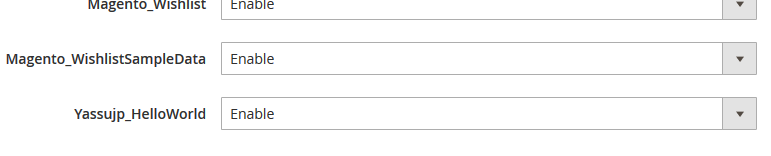
モジュールの一覧は以下で確認できます。
STORES - Configuration - ADVANCED - Advanced
管理画面に設定メニューを追加する†
idとfrontNameを定義します。
app/code/Yassujp/HelloWorld/etc/adminhtml/routes.xml
<?xml version="1.0"?>
<config xmlns:xsi="http://www.w3.org/2001/XMLSchema-instance" xsi:noNamespaceSchemaLocation="../../../../../../lib/internal/Magento/Framework/App/etc/routes.xsd">
    <router id="admin">
        <route id="yassujp_helloworld" frontName="yassujp_helloworld">
            <module name="Yassujp_HelloWorld" />
        </route>
    </router>
</config>
フォームを定義します。
app/code/Yassujp/HelloWorld/etc/adminhtml/system.xml
<?xml version="1.0"?>
<config xmlns:xsi="http://www.w3.org/2001/XMLSchema-instance" xsi:noNamespaceSchemaLocation="../../../../Magento/Config/etc/system_file.xsd">
    <system>
        <tab id="yassujp" translate="label" sortOrder="10">
            <label>Yassujp</label>
        </tab>
        <section id="yassujp_helloworld" translate="label" type="text" sortOrder="10" showInDefault="1" showInWebsite="1" showInStore="1">
            <label>Yassujp_HelloWorld</label>
            <tab>yassujp</tab>
            <resource>Yassujp_HelloWorld::yassujp_helloworld</resource>
            <group id="general" translate="label" type="text" sortOrder="10" showInDefault="1" showInWebsite="0" showInStore="0">
                <label>General</label>
                <field id="enable" translate="label comment" type="select" sortOrder="10" showInDefault="1" showInWebsite="1" showInStore="1">
                    <label>Enable Hello World</label>
                    <source_model>Magento\Config\Model\Config\Source\Yesno</source_model>
                    <comment>
                        Comment for `Enable Hello World` setting.
                    </comment>
                </field>
                <field id="block_label" translate="label" type="text" sortOrder="20" showInDefault="1" showInWebsite="1" showInStore="1">
                    <label>Block Label</label>
                </field>
                <field id="text_align" translate="label" type="select" sortOrder="30" showInDefault="1" showInWebsite="1" showInStore="1">
                    <label>Text Align</label>
                    <source_model>Yassujp\HelloWorld\Model\Source\Align</source_model>
                </field>
            </group>
        </section>
    </system>
</config>
Yes / No の選択肢は Magento\Config\Model\Config\Source\Yesno を利用します。
vendor\magento\module-config\Model\Config\Source\Yesno.php
テキスト位置の選択肢は別途定義します。
app/code/Yassujp/HelloWorld/Model/Source/Align.php
<?php

namespace Yassujp\HelloWorld\Model\Source;

class Align implements \Magento\Framework\Option\ArrayInterface
{
    public function toOptionArray()
    {
        return [['value' => 'left', 'label' => __('Left Position')], ['value' => 'center', 'label' => __('Center Position')], ['value' => 'right', 'label' => __('Right Position')]];
    }

    public function toArray()
    {
        return ['left' => __('Left Position'), 'center' => __('Center Position'), 'right' => __('Right Position')];
    }
}
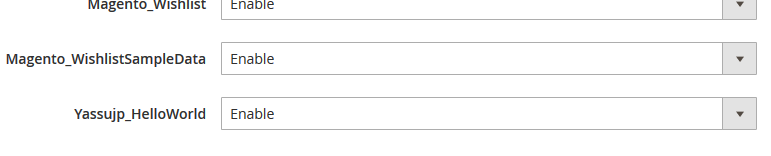
STORES - Configuration にて作成したモジュールのフォームが表示されていれば成功です。

保存した設定は core_config_data テーブルに格納されます。
参考
- http://www.venustheme.com/how-to-create-magento-2-module/
- http://inchoo.net/magento-2/how-to-create-a-basic-module-in-magento-2/
- https://blog.amasty.com/how-to-create-a-magento-2-extension/

 Yassujp_HelloWorld.png
 Yassujp_HelloWorld2.png


